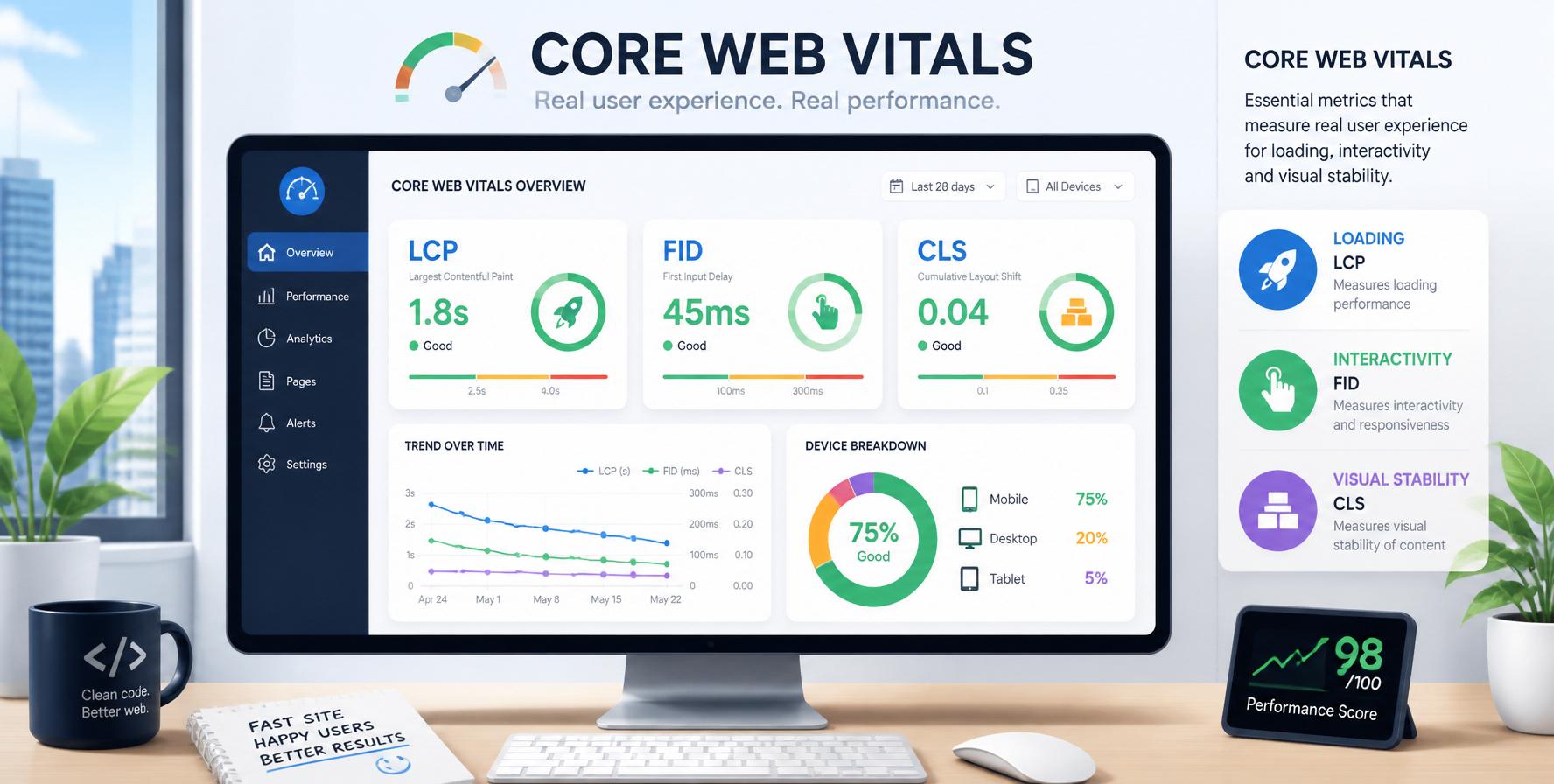
What Are Core Web Vitals?
Core Web Vitals are a set of specific factors that Google considers important in a webpage's overall user experience. They are part of Google's Page Experience ranking signal, which became a ranking factor in 2021 and continues to be a crucial element of Technical SEO in 2026.
Core Web Vitals measure three key aspects of user experience:
- Loading performance — How fast does your page load?
- Interactivity — How quickly can users interact with your page?
- Visual stability — Does your page shift unexpectedly while loading?
Google uses these metrics to evaluate whether your website provides a good user experience. Websites that pass the Core Web Vitals assessment are more likely to rank higher in search results, especially on mobile devices where user experience is paramount.
Key takeaway: Core Web Vitals are Google's way of measuring real-world user experience. They directly impact your SEO rankings and are essential for any Technical SEO strategy in 2026.
1. LCP — Largest Contentful Paint
Largest Contentful Paint (LCP) measures loading performance. It marks the point in the page load timeline when the largest image or text block is rendered on the screen. Essentially, it tells you how long it takes for the main content of your page to become visible to users.
LCP
Measures loading speed — the time it takes for the largest element (image or text) to become visible.
FID
Measures interactivity — the delay between a user's first interaction (click, tap, keypress) and the browser's response.
CLS
Measures visual stability — the total sum of unexpected layout shifts that occur during the page's entire lifespan.
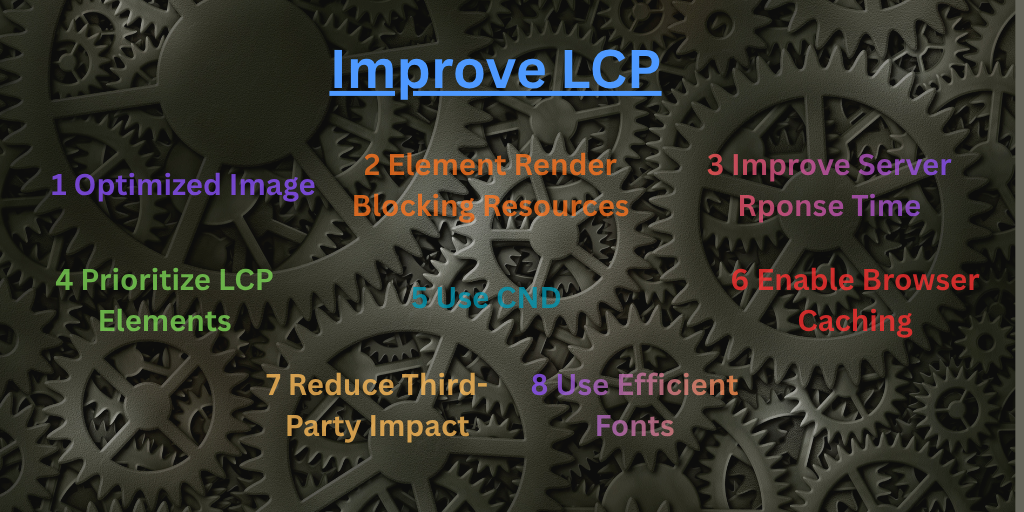
How to Improve LCP?
- Optimize images: Use modern formats like WebP, compress images, and implement lazy loading for off-screen images.
- Minimize CSS and JavaScript: Remove render-blocking resources and use code splitting to load critical CSS first.
- Use a CDN: Content Delivery Networks reduce latency by serving assets from servers closer to the user.
- Upgrade hosting: Better server response times (TTFB) directly improve LCP.
- Preload important assets: Use
<link rel="preload">for hero images and critical fonts.
Pro tip: Use Google's PageSpeed Insights to identify LCP issues. It provides specific recommendations for each element that's slowing down your LCP score.
2. FID — First Input Delay
First Input Delay (FID) measures interactivity. It captures the time from when a user first interacts with your page (like clicking a button, tapping a link, or typing in a form) to the moment the browser can process that interaction.
FID is a field metric — it's measured in real user conditions, not in a lab. This means it reflects how actual users experience your site on their devices and network connections.
How to Improve FID
- Optimize JavaScript execution: Break up long tasks (JavaScript execution longer than 50ms) into smaller chunks.
- Use a web worker: Offload non-critical JavaScript to background threads.
- Defer non-critical scripts: Use
asyncordeferfor third-party scripts that aren't essential for initial interaction. - Reduce DOM size: A large DOM tree can slow down interaction processing.
- Minimize main thread work: Reduce the amount of work the browser has to do on the main thread during page load.
Note: FID is gradually being replaced by INP (Interaction to Next Paint) in March 2024. INP measures overall responsiveness, not just the first input. Start optimizing for INP as well.
3. CLS — Cumulative Layout Shift
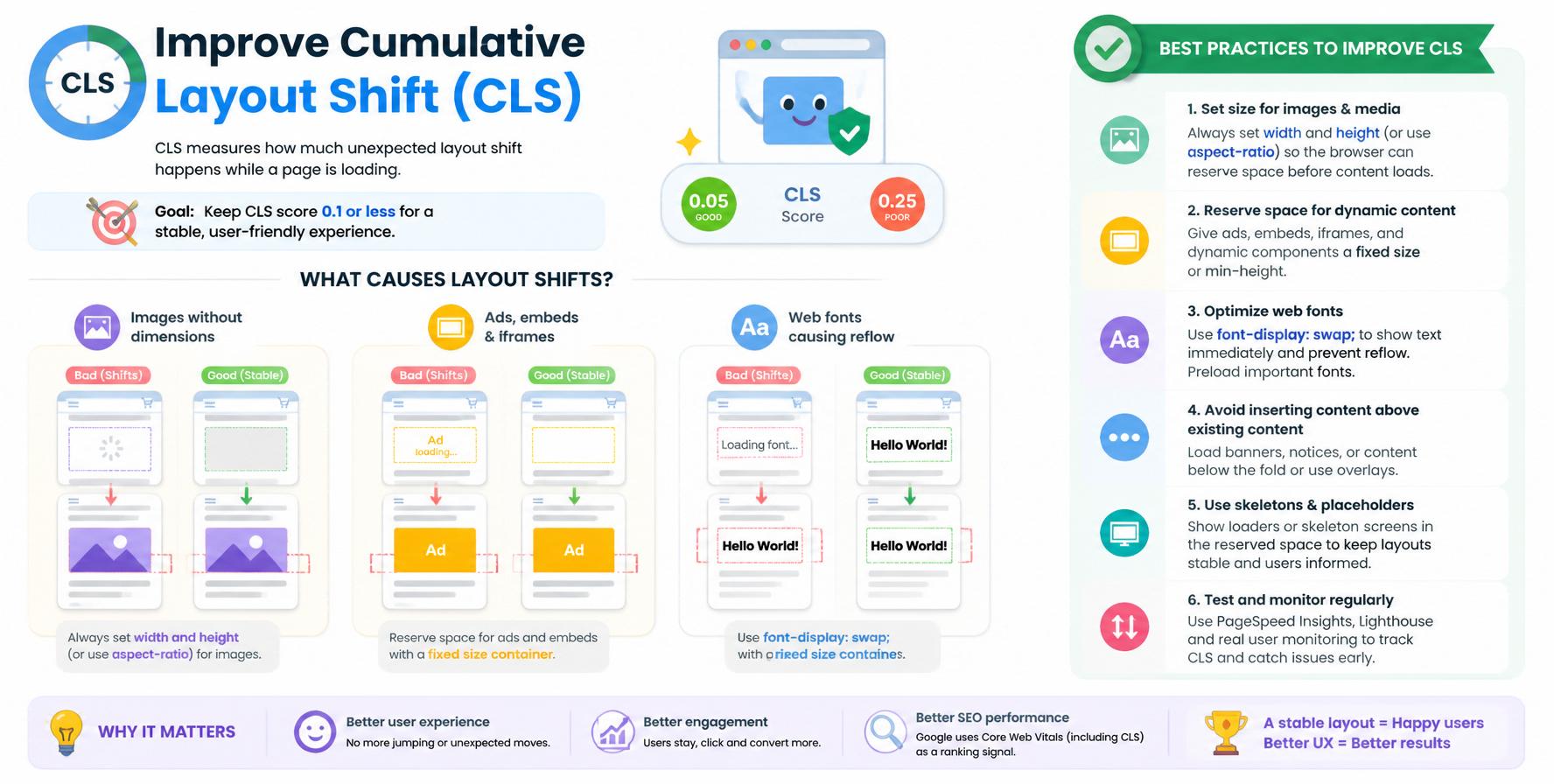
Cumulative Layout Shift (CLS) measures visual stability. It quantifies how much the visible content shifts unexpectedly during the page load process. A high CLS score means users experience annoying jumps — like when a button moves right as they're about to click it.
CLS is calculated by measuring the impact fraction (how much of the viewport is affected) and the distance fraction (how far the elements shifted). The score ranges from 0 (no shift) to positive numbers, with lower being better.
How to Improve CLS?
- Set dimensions on images and videos: Always use
widthandheightattributes on media elements. - Reserve space for ads: Use fixed dimensions for ad containers to prevent them from pushing content around.
- Avoid dynamically injected content: If you must inject content above existing content, do it early in the load process.
- Use CSS transform animations: Animations that use
transforminstead of properties liketop,left, ormargindon't cause layout shifts. - Load fonts properly: Use
font-display: optionalorfont-display: swapto prevent FOIT (Flash of Invisible Text).
Why Core Web Vitals Matter for SEO
Core Web Vitals are a direct Google ranking factor. Here's why they matter for your SEO strategy:
- Ranking Signal: Pages that pass the Core Web Vitals assessment (all three metrics in the "good" range) may rank higher than pages that don't, all else being equal.
- User Experience: Better performance leads to lower bounce rates, higher engagement, and more conversions — all of which indirectly boost SEO.
- Mobile-First Indexing: Core Web Vitals are especially important for mobile users, as Google prioritizes mobile experience in rankings.
- Page Experience Update: Core Web Vitals are part of Google's broader Page Experience signal, which includes HTTPS, mobile-friendliness, and intrusive interstitials.
- Competitive Advantage: Most websites still struggle with Core Web Vitals. Optimizing them can give you an edge over competitors.
How to Measure Core Web Vitals
There are several tools you can use to measure your Core Web Vitals:
| Tool | Type | Best For |
|---|---|---|
| PageSpeed Insights | Lab + Field | Overall score and specific optimization recommendations |
| Google Search Console (Core Web Vitals report) | Field | Real user data for all pages on your site |
| Lighthouse (Chrome DevTools) | Lab | Detailed performance audits during development |
| Chrome UX Report (CrUX) | Field | Real user data aggregated from Chrome users |
| Web Vitals JavaScript Library | Field | Custom tracking with Google Analytics or RUM tools |
How to Optimize Core Web Vitals
Here's a practical checklist for optimizing all three Core Web Vitals:
For LCP (Loading):
- Optimize images: compress, use WebP/AVIF, implement responsive images.
- Enable lazy loading for off-screen images and iframes.
- Minify CSS and JavaScript, and defer non-critical resources.
- Use a CDN and implement HTTP/2 or HTTP/3.
- Reduce server response time (TTFB) — upgrade hosting if needed.
For FID / INP (Interactivity):
- Break up long tasks — use
setTimeoutorrequestIdleCallback. - Minimize main thread work — reduce JavaScript execution time.
- Use web workers for heavy computations.
- Defer third-party scripts (like analytics and social widgets).
- Reduce DOM size and complexity.
For CLS (Visual Stability):
- Set explicit dimensions on images, videos, and iframes.
- Reserve space for dynamic content (ads, banners, forms).
- Use CSS
transformfor animations instead of layout-changing properties. - Preload fonts with
font-display: swaporoptional. - Avoid injecting content above existing content after page load.
Pro tip: Use Lighthouse CI to automatically test Core Web Vitals during your development process. This prevents performance regressions before they reach production.
Core Web Vitals FAQ
Common questions about Core Web Vitals answered.
Core Web Vitals are a set of three metrics — LCP, FID, and CLS — that measure loading speed, interactivity, and visual stability. They are Google's way of quantifying user experience for ranking purposes.
Yes, Core Web Vitals are a confirmed Google ranking factor. They are part of the Page Experience signal, which also includes HTTPS, mobile-friendliness, and the absence of intrusive interstitials.
A good LCP score is 2.5 seconds or less. Scores between 2.5s and 4s need improvement, and anything above 4s is considered poor and will negatively affect your rankings.
A good FID score is 100 milliseconds or less. Scores between 100ms and 300ms need improvement, and anything above 300ms is considered poor.
A good CLS score is 0.1 or less. Scores between 0.1 and 0.25 need improvement, and anything above 0.25 is considered poor.
You can check your Core Web Vitals using Google PageSpeed Insights, Google Search Console (Core Web Vitals report), or Lighthouse in Chrome DevTools. Each provides detailed insights and optimization recommendations.
Ready to Improve Your Technical SEO?
Explore all our Technical SEO and Performance guides to start optimizing your website today.
Explore All Technical SEO Guides →