
What Is Schema Markup?
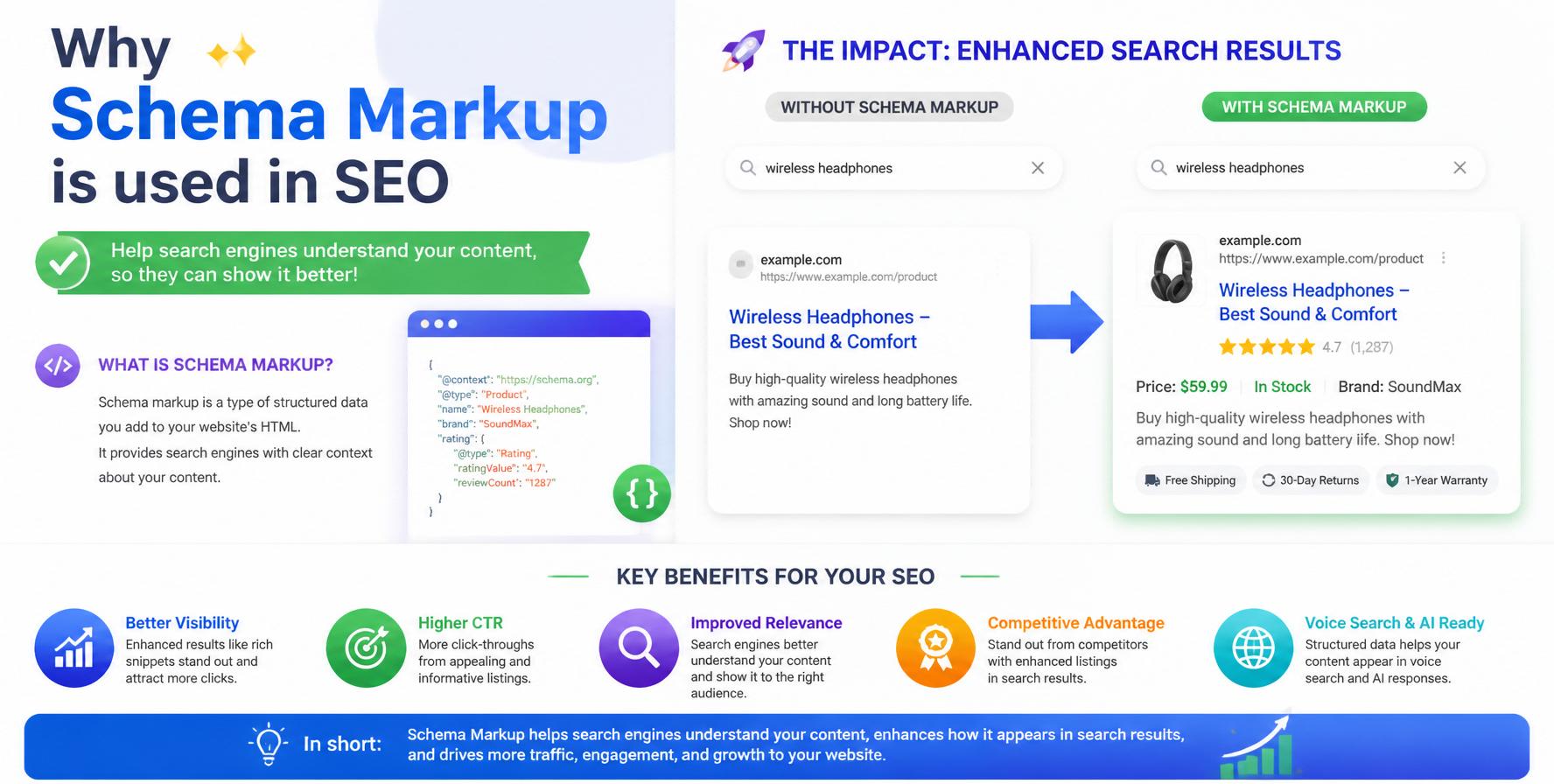
Schema Markup (also called structured data) is a code that you add to your website to help search engines understand your content better. It uses a standardized vocabulary — Schema.org — to label different types of information, such as articles, products, events, reviews, and more.
When search engines read your Schema Markup, they can display your content as rich snippets in search results — which means extra information like star ratings, images, prices, and event dates appear right below your page title. These enhanced results attract more attention and clicks.
Schema.org is a collaborative project created by Google, Bing, Yahoo, and Yandex. The vocabulary includes hundreds of types for virtually any kind of content. The most popular format for implementing Schema today is JSON-LD (JavaScript Object Notation for Linked Data), which Google recommends because it's easy to implement and maintain.
Key takeaway: Schema Markup is not a ranking factor by itself, but it significantly improves click-through rates (CTR) by making your search results more attractive and informative — which indirectly boosts SEO performance.
Why Schema Markup used in SEO
Schema Markup offers several powerful benefits for your SEO strategy:
- Rich Snippets: Schema enables rich results like star ratings, product prices, event dates, and FAQs directly in search results, making your listing stand out.
- Higher Click-Through Rates (CTR): Rich snippets are visually appealing and provide more information at a glance, leading to more clicks from searchers.
- Better Content Understanding: Schema helps search engines understand the context and relationships between different elements on your page, improving relevance signals.
- Voice Search Optimization: Schema provides structured data that voice assistants (like Google Assistant, Siri, and Alexa) can use to answer questions directly.
- Knowledge Panel Integration: Schema helps Google populate knowledge panels with accurate information about your brand, organization, or people.
- Featured Snippets: Well-structured content with appropriate Schema is more likely to be selected for featured snippets (position zero).
Types of Schema Markup
There are hundreds of Schema types available on Schema.org. Here are the most commonly used and most valuable for SEO:
Article
Blog posts, news articles, and editorial content. Includes headline, author, datePublished, and image.
Product
E-commerce products with price, availability, reviews, and brand information.
Event
Concerts, conferences, webinars, and other events with date, location, and ticket info.
Person
Biographical information about individuals — useful for authors, speakers, and team members.
Organization
Company information — logo, contact details, social profiles, and address.
Review / Rating
User reviews and ratings with aggregate ratings displayed in search results.
FAQ
Frequently Asked Questions — allows direct answers in search results.
Recipe
Cooking recipes with ingredients, cooking time, nutrition, and ratings.
VideoObject
Videos with title, description, duration, thumbnail, and upload date.
How to Implement Schema Markup
There are several ways to add Schema Markup to your website, depending on your platform and technical comfort level:
1. JSON-LD (Recommended)
JSON-LD is Google's preferred format. You add a <script> block in the <head> or <body> of your page. It's the easiest to implement and doesn't affect your HTML structure. Here's a basic example:
{
  "@context": "https://schema.org",
  "@type": "Article",
  "headline": "Schema Markup Guide",
  "author": {
    "@type": "Person",
    "name": "Rankqi Team"
  },
  "datePublished": "2026-07-09",
  "image": "https://example.com/image.jpg"
}
2. Microdata
Microdata uses HTML attributes like itemscope, itemtype, and itemprop directly in your HTML tags. It's more difficult to maintain because the Schema is mixed with your content markup.
3. RDFa
RDFa is another HTML-based format similar to Microdata but less commonly used today. It uses attributes like vocab, typeof, and property.
4. Plugins (WordPress & CMS)
If you're using WordPress, plugins like Yoast SEO, RankMath, or Schema Pro make Schema implementation easy. They automatically generate JSON-LD for your pages, posts, products, and more without writing any code.
Pro tip: Start with JSON-LD — it's the simplest, most maintainable, and most widely supported format. Google, Bing, and Yandex all fully support it.
JSON-LD Schema Examples
Here are practical JSON-LD examples for the most common Schema types:
Article Schema
{
  "@context": "https://schema.org",
  "@type": "Article",
  "headline": "Your Blog Post Title",
  "description": "A short description of your article.",
  "author": { "@type": "Person", "name": "Author Name" },
  "datePublished": "2026-07-09",
  "image": "https://example.com/featured-image.jpg"
}
Product Schema
{
  "@context": "https://schema.org",
  "@type": "Product",
  "name": "Your Product Name",
  "description": "Product description here.",
  "sku": "ABC123",
  "offers": {
    "@type": "Offer",
    "price": "99.99",
    "priceCurrency": "USD",
    "availability": "https://schema.org/InStock"
  },
  "image": "https://example.com/product-image.jpg"
}
FAQ Schema
{
  "@context": "https://schema.org",
  "@type": "FAQPage",
  "mainEntity": [
    {
      "@type": "Question",
      "name": "What is Schema Markup?",
      "acceptedAnswer": {
        "@type": "Answer",
        "text": "Schema Markup is structured data that helps search engines understand your content."
      }
    }
  ]
}
Organization Schema
{
  "@context": "https://schema.org",
  "@type": "Organization",
  "name": "Your Company Name",
  "description": "Company description.",
  "logo": "https://example.com/logo.png",
  "url": "https://example.com",
  "sameAs": [
    "https://facebook.com/yourpage",
    "https://twitter.com/yourhandle",
    "https://linkedin.com/company/yourcompany"
  ]
}
Schema Markup Best Practices
Follow these best practices to maximize the impact of your Schema Markup:
- Use Only Relevant Schema Types: Don't add Schema that doesn't match your content. It can be seen as spammy and may lead to penalties.
- Be Accurate and Specific: Make sure all information in your Schema matches the actual content on the page. Misleading data can harm your credibility.
- Include All Required Properties: Each Schema type has required and recommended properties. Missing required fields may prevent rich snippets from appearing.
- Validate Your Schema: Always test your Schema with Google's Rich Results Test or Schema.org's validator before publishing.
- Keep It Updated: If your content changes (e.g., price updates, new reviews), update your Schema accordingly.
- Use JSON-LD: It's Google's recommended format and the easiest to maintain across different pages.
- Don't Use Hidden Data: Your Schema should always reflect information visible to users. Don't use Schema to hide data or manipulate rankings.
- Add Schema to All Important Pages: Prioritize high-value pages like product pages, articles, and services pages.
- Monitor Rich Snippets: Use Google Search Console to track which pages are generating rich results and fix any issues.
Testing & Validation Tools for Schema
Before publishing your Schema, always test it with these tools:
| Tool | Type | Best For |
|---|---|---|
| Google Rich Results Test | Live Testing | Testing individual URLs for rich result eligibility |
| Schema.org Validator | Code Validation | Checking Schema syntax and structure |
| Google Search Console | Monitoring | Tracking rich results and Schema errors across your site |
| Yoast SEO / RankMath | Generation | Automatically generating Schema (WordPress only) |
| Schema Markup Generator | Generation | Creating Schema code without coding (Merlin, TechnicalSEO) |
Pro tip: After implementing Schema, use the URL Inspection tool in Google Search Console to see how Google sees your page and whether it's detecting your structured data correctly.
Schema Markup FAQ
Common questions about Schema Markup and structured data answered.
Schema Markup is structured data code that you add to your website to help search engines understand your content better. It uses Schema.org vocabulary to label different types of information.
No, Schema Markup is not a direct ranking factor. However, it enables rich snippets which increase click-through rates (CTR). Higher CTR can indirectly improve your rankings over time.
JSON-LD (JavaScript Object Notation for Linked Data) is Google's recommended format for Schema Markup. It's a script-based format that doesn't interfere with your HTML and is the easiest to implement and maintain.
Schema is the vocabulary. Microdata and RDFa embed Schema in HTML attributes. JSON-LD is a separate script block that doesn't touch your HTML. Google recommends JSON-LD because it's the simplest and most maintainable.
Use Google's Rich Results Test, the Schema.org Validator, or the URL Inspection tool in Google Search Console. These tools will show you whether your Schema is valid and which rich snippets are eligible.
Not necessarily. Focus on high-value pages — product pages, articles, events, and services pages. Implementing Schema on every page is beneficial, but prioritize the pages that matter most to your business and are most likely to generate rich snippets.
Ready to Master Technical SEO?
Explore all our Technical SEO, Structured Data, and Performance guides to start optimizing your website today.
Explore All Technical SEO Guides →