.jpg)
sitemap.xml
Sitemap is SEO Friendly
To Google & Bing
Pages are in Search Results
What is an XML Sitemap?
An XML sitemap is a file that lists all the important pages on your website, helping search engines like Google, Bing, and Yahoo discover and index your content more efficiently. Think of it as a roadmap that guides search engine crawlers to all the pages you want to rank in search results.
The XML sitemap format includes metadata such as the last modification date, change frequency, and priority of each URL. This information helps search engines understand which pages are most important and how often they are updated, enabling smarter and more efficient crawling.
For large websites with thousands of pages, an XML sitemap is critical to ensure every important page is discovered. Even for smaller sites, it provides a clean, machine-readable list that complements internal linking and site navigation. Additionally, sitemaps can include hreflang annotations for multilingual content, helping search engines serve the correct language version to users worldwide — a cornerstone of international SEO.
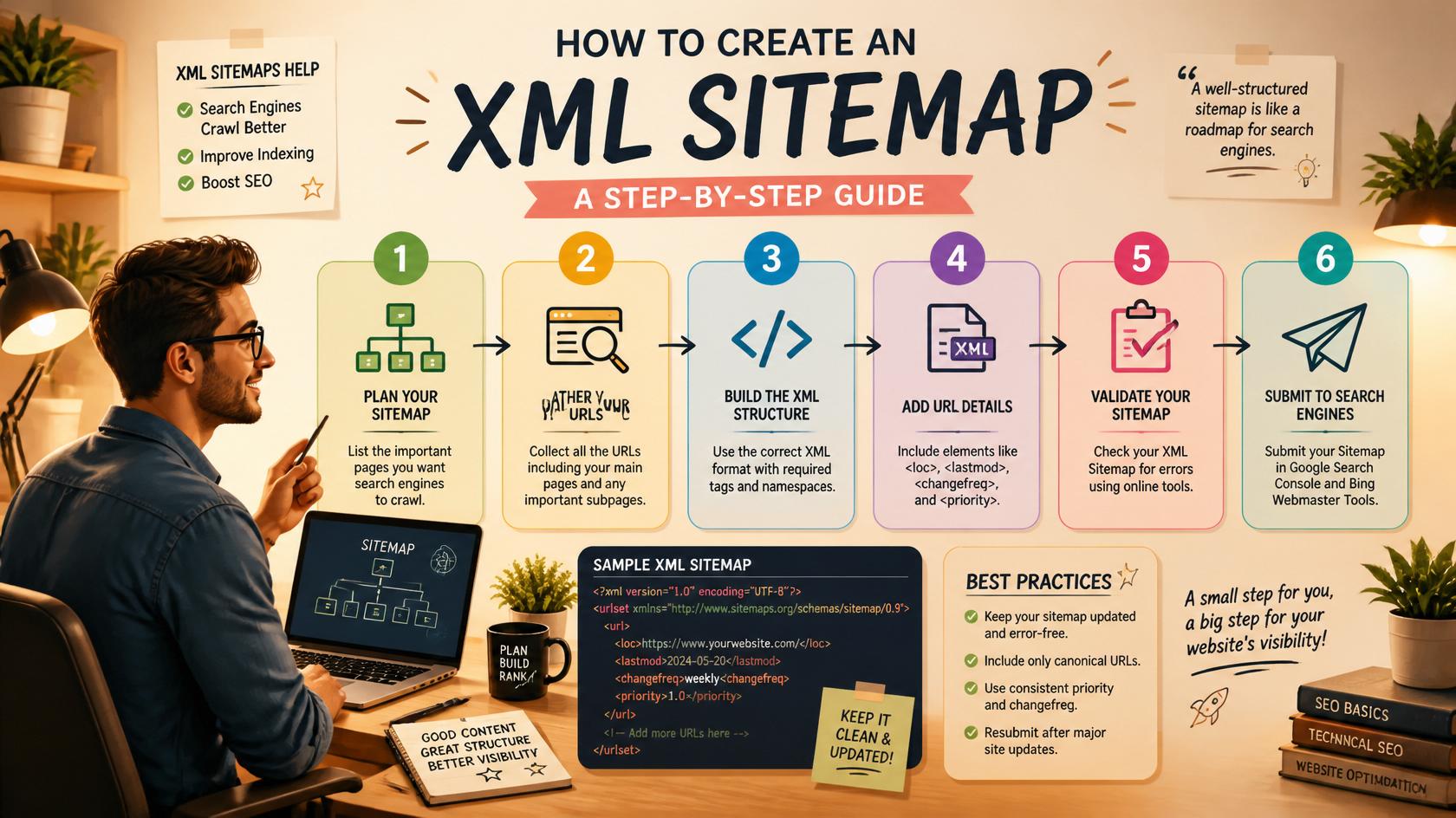
Key takeaway: An XML sitemap is essential for Technical SEO because it ensures search engines can find and index all your important pages — especially new content, large websites, and sites with complex architectures.
Why XML Sitemap Matters for SEO?
XML sitemaps play a crucial role in SEO for several reasons:
- Improved Crawlability: Search engine bots can discover pages that might otherwise be missed, especially if your site has deep navigation, poor internal linking, or orphaned pages.
- Faster Indexing: New pages and updated content get indexed faster when submitted via sitemap, which is critical for time-sensitive content like blog posts, news articles, or product launches.
- Better Crawl Budget Management: By prioritizing important pages, you help search engines allocate their crawl budget efficiently, ensuring high-value pages (like your main product or service pages) are crawled more frequently.
- Multilingual and Multi-regional Support: Sitemaps can include hreflang annotations to help search engines understand language and regional targeting, which is essential for international SEO.
- Video and Image Indexing: You can extend XML sitemaps to include video and image metadata, helping your visual content appear in video and image search results, thus enhancing your Image SEO and video discoverability.
- News Sitemaps: Publishers can submit news-specific sitemaps to be eligible for Google News, ensuring timely content gets indexed rapidly.
In short, an XML sitemap is a foundational element of any technical SEO strategy. It doesn't guarantee rankings, but it ensures search engines know about all your valuable content, which is a prerequisite for ranking well.
Types of XML Sitemaps
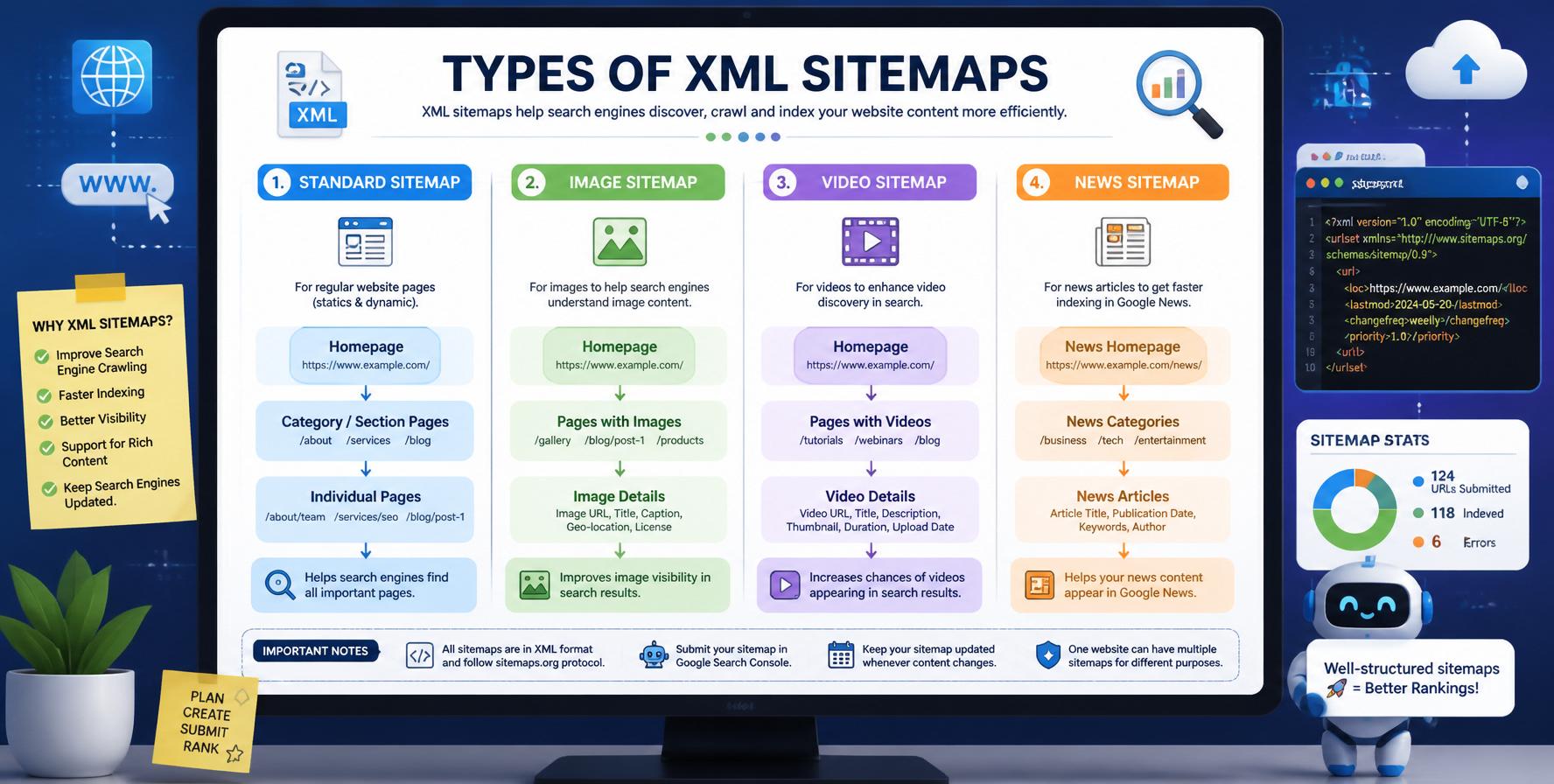
There are several types of sitemaps depending on your content:
- Standard XML Sitemap: The most common type, listing URLs with metadata like
lastmod,changefreq, andpriority. - Video Sitemap: Includes video-specific metadata like title, description, thumbnail URL, and video duration. Essential for YouTube SEO and video indexing.
- Image Sitemap: Helps search engines find and index images on your site, improving Image SEO and visual search visibility.
- News Sitemap: Designed for news publishers to submit articles to Google News, with strict eligibility requirements (e.g., article must be published within the last 2 days).
- Mobile Sitemap: (Deprecated) Used to indicate mobile-specific content; now replaced by responsive design and mobile-first indexing.
For most websites, a standard XML sitemap is sufficient. However, if your site relies heavily on video content, news articles, or has a large image library, implementing specialized sitemaps can boost your visibility in vertical search results. Google Search Console allows you to submit multiple sitemaps, so you can manage different types separately.
How to Create an XML Sitemap?
Creating an XML sitemap can be done in several ways, depending on your website platform:
1. WordPress Sitemap (Yoast / RankMath)
If you're using WordPress, the easiest way is to use an SEO plugin like Yoast SEO or RankMath. Both generate dynamic XML sitemaps automatically. You can customize which post types, categories, and tags are included, and submit the sitemap URL (e.g., yourdomain.com/sitemap_index.xml) to Google Search Console. This is a key part of WordPress SEO.
2. Online Sitemap Generators
For non-WordPress sites, use free online generators like XML-Sitemaps.com or Screaming Frog. These tools crawl your website and generate an XML sitemap file that you can download and upload to your server's root directory. This method is ideal for static HTML sites, small businesses, or if you don't have server-side scripting.
3. Manual XML Sitemap Creation
For developers, you can create an XML sitemap manually using a text editor. The file must follow the sitemap protocol (sitemaps.org) with proper XML structure. This is more complex but gives full control over URL inclusion and metadata. Manual creation is often used for custom applications where automated generation isn't feasible.
4. CMS Plugins and Extensions
Other CMS platforms like Shopify, Joomla, Drupal, and Magento also offer sitemap extensions or built-in features. For instance, Shopify automatically generates a sitemap at /sitemap.xml. Always check your platform's documentation for the easiest approach.

How to Submit XML Sitemap to Search Engines?
Once your XML sitemap is ready, you need to submit it to search engines:
- Google Search Console: Go to "Sitemaps" under "Indexing" and enter your sitemap URL (e.g.,
sitemap.xml). Click "Submit" and Google will begin crawling your pages. - Bing Webmaster Tools: Similar process — navigate to "Sitemaps" and submit your sitemap URL.
- Robots.txt: You can also add a line in your
robots.txtfile pointing to your sitemap:Sitemap: https://yourdomain.com/sitemap.xml. This helps search engines find it automatically. - Yandex Webmaster: If you target Russian-speaking audiences, submit your sitemap to Yandex as well.
After submission, Google Search Console provides a detailed report showing which pages were submitted and how many were actually indexed. This data is invaluable for diagnosing indexing issues. If you notice that important pages are submitted but not indexed, you may need to investigate further — for instance, check for robots meta tags blocking indexing, or use the URL inspection tool to test individual pages.
Pro tip: After submitting, monitor the "Sitemaps" report in Google Search Console to check for errors, coverage, and the number of submitted vs. indexed pages. This is a critical part of your Technical SEO audit.
XML Sitemap Best Practices
Follow these sitemap best practices to maximize your SEO benefits:
- Keep it Updated: Regenerate your sitemap whenever you add, update, or remove pages. WordPress plugins like Yoast and RankMath handle this automatically. For static sites, set up a cron job to regenerate periodically.
- Limit URLs per Sitemap: Each sitemap file should contain no more than 50,000 URLs and be under 50MB (uncompressed). For larger sites, use a sitemap index file that lists multiple sitemaps (e.g., one for posts, one for pages, one for products).
- Prioritize Important Pages: Use the
prioritytag to indicate relative importance (0.0 to 1.0). However, search engines may not use this heavily, so focus on high-quality content and logical structure. - Include Only Canonical URLs: Ensure you're listing canonical versions of pages to avoid duplicate content issues. This is essential for canonical tag implementation.
- Use Compressed Sitemaps: For large sitemaps, use gzip compression (e.g.,
sitemap.xml.gz) to reduce file size and improve crawl efficiency. Search engines support compressed sitemaps. - Validate Your Sitemap: Use tools like Google's sitemap validator or your browser to check for XML errors before submission. Even a small syntax error can break the entire sitemap.
- Submit All Sitemap Versions: If you have separate sitemaps for images, videos, or news, submit each one individually in Search Console for better coverage.
- Monitor Sitemap Errors: Regularly check the Sitemaps report in Google Search Console for errors like "URL not accessible" or "Sitemap contains URL that is blocked by robots.txt." Fix these issues promptly.
XML Sitemap FAQ
Common questions about XML sitemaps answered.
An XML sitemap is a file that lists all the important pages on your website to help search engines discover and index your content efficiently. It includes metadata like last modification date, change frequency, and priority.
While not mandatory, an XML sitemap is highly recommended for most websites — especially large sites, new sites with few backlinks, or sites with deep navigation. It ensures all your important pages are discovered and indexed.
Use SEO plugins like Yoast SEO or RankMath. Both generate dynamic XML sitemaps automatically. Simply enable the sitemap feature in the plugin settings, and your sitemap will be available at yourdomain.com/sitemap_index.xml.
Submit your sitemap via Google Search Console. Go to "Sitemaps" under "Indexing", enter your sitemap URL, and click "Submit". You can also add a sitemap directive in your robots.txt file.
An XML sitemap is for search engines — it helps crawlers discover and index your pages. An HTML sitemap is for users — it provides a visual, organized list of your pages to help visitors navigate your site.
Update your sitemap whenever you add, update, or remove pages. If you're using WordPress with Yoast or RankMath, the sitemap updates automatically. For static sites, regenerate and re-upload the file after each content change.
Ready to Improve Your Technical SEO?
Explore all our Technical SEO guides and start optimizing your website today.
Explore All Technical SEO Guides →